Nuvio Setup Guide: Best Addons for Movies and Subtitles
Set up Nuvio with PenguPlay, Showbox, OpenSubtitles v3 and Community Subtitles for free streams and subtitles, plus optional BetterPosters and Cinemeta.
This guide sets up Nuvio with the addons I use for streams and subtitles. It is for anyone who wants a Stremio-style app without torrents or a debrid service.
What Nuvio is
Nuvio is a free, open-source app for watching movies and TV shows. The source code is on GitHub.
On its own, Nuvio has nothing to play. It gets its content from addons, the same addons that Stremio uses. Some addons give you streams, some give you subtitles, and some give you catalogs and posters. You pick the ones you want and paste their links into the app.
If you would rather watch in a browser, I keep a list of free movie streaming sites too.
Install Nuvio
Download the app from the Nuvio website:
- Android: get the APK from GitHub Releases.
- iPhone and iPad: join the Nuvio TestFlight.
- Android TV: use NuvioTV.
- Windows, macOS and Linux: get Nuvio Desktop from GitHub Releases. Pick the
.msifor Windows, the.dmgfor macOS (arm64for Apple Silicon,x86_64for Intel), or the AppImage,.deb,.rpmor Flatpak for Linux. It is still in alpha, so expect some bugs.
How to add an addon in Nuvio
Sign in to your Nuvio account first. Your addons are saved to your account, so you add them once and they show up on every device where you sign in.
Every addon has an install link that ends in manifest.json. To add one:
- Open Settings → Media → Content → Addons.
- Tap Add Addon.
- Paste the link into Addon URL.
- Tap Install Addon.
I use these same steps for every addon below.
Stream addons
These two addons give you the actual video links. Both use direct HTTP streams, so you don't need torrents or a debrid account.
PenguPlay
PenguPlay finds streams for movies and series. You can choose which providers it uses and which video qualities it shows.
Install link:
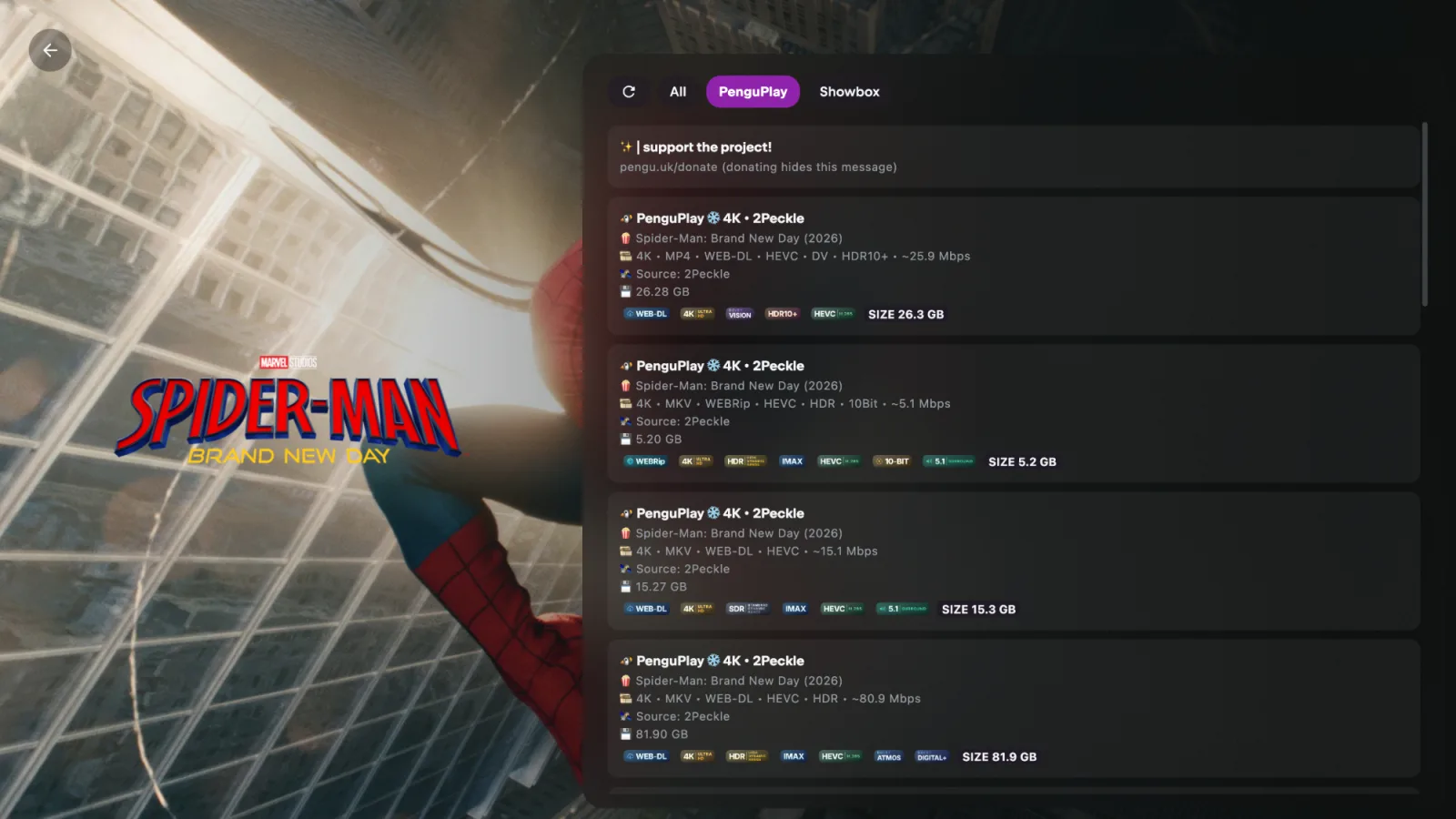
https://pengu.uk/manifest.jsonWhen you open a movie, Nuvio lists the streams from each addon. You can filter them by addon at the top.
Showbox
Showbox streams movies and series from Showbox in up to 4K. It needs your own FebBox cookie, so it takes a few more steps:
- Sign in to FebBox in a desktop browser.
- Open DevTools (
F12) → Application → Cookies →febbox.com. - Copy the value of the cookie named
ui. It usually starts witheyJ. - Open the Showbox configure page and paste the cookie.
- Copy the install link it gives you and add it to Nuvio.
Keep this link private. It contains your cookie.
Subtitle addons
OpenSubtitles v3
The official subtitle addon from Stremio. It has subtitles in many languages for most movies and shows.
Install link:
https://opensubtitles-v3.strem.io/manifest.jsonStremio Community Subtitles
Stremio Community Subtitles fills the gaps. When a movie has no good subtitle, you can upload your own .srt file and it shows up on every device you use. Your upload also helps other people who watch the same file. The code is on GitHub.
Create an account on the site, copy your personal install link, and add it to Nuvio.
Optional addons
You don't need these addons to watch anything, but they make the app nicer to browse.
Cinemeta
Cinemeta is Stremio's official catalog addon. It gives you the movie and series lists, titles, and descriptions. If it isn't in your addon list already, add it:
https://v3-cinemeta.strem.io/manifest.jsonBetterPosters
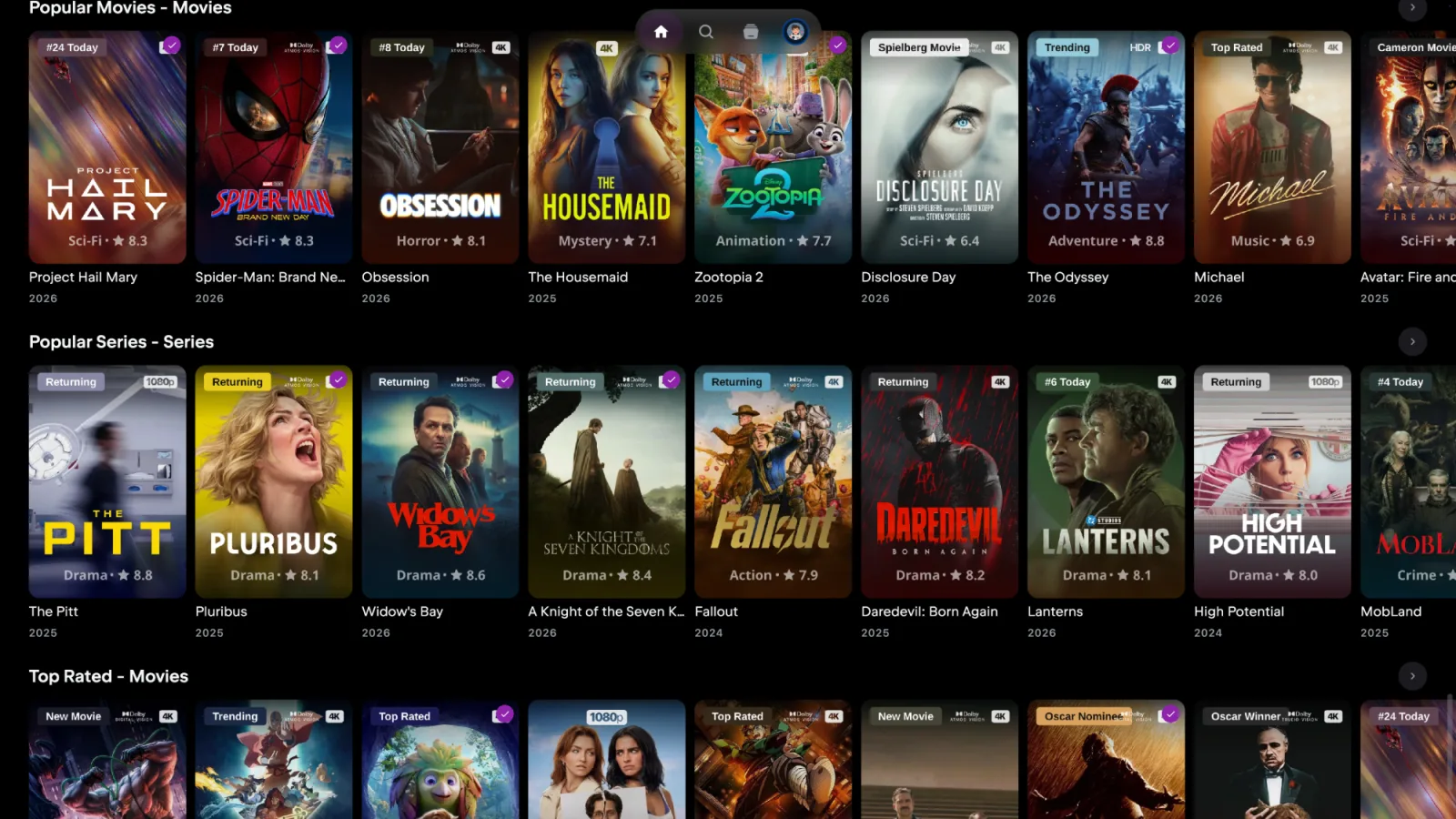
BetterPosters swaps the plain posters for ones that show ratings and quality badges such as 4K or HDR. To use it in Nuvio, use the Nuvio BetterPosters addon:
- Copy its Cinemeta install link from the GitHub page and add it to Nuvio.
- Turn off your original Cinemeta. If you leave both on, you get every row twice.
Here is the Nuvio home screen with BetterPosters on. Each poster shows the genre, rating, and badges such as 4K or Dolby Vision.
To use BetterPosters with a different catalog addon, paste that addon's link into the BetterPosters configurator and add the link it creates.
Tips
- Order your addons. Put the stream addon you like most at the top. Nuvio lists its streams first.
- If a stream doesn't play, pick another link or try the other addon. These addons pull from third-party sources, and sources go down sometimes.
- Use a VPN. You don't know who runs the sources behind these addons.